
Agentic engineering, in practice
I run this studio with one teammate: Build Studio, a multi-agent system that coordinates a small team of specialised agents — what I call agentic engineering, the practice of building software with an AI agent fleet against a written spec. Most of the site claims that and moves on; this page shows it. Below — a full run on video, the loop I run, the PRD lifecycle that organises it, and screenshots of the dashboard that runs the agents.
> build-studio run --phase=execution
  ↳ qa: e2e tests passed (12/12)
  ↳ frontend_dev: implementing PRD-008
  ↳ security: audit queued
  ↳ ship: ready_
Watch a full run
One user story, start to finish: a draft PRD taken through the review and execution workflows in Build Studio, ending in a merged change.
The loop I run
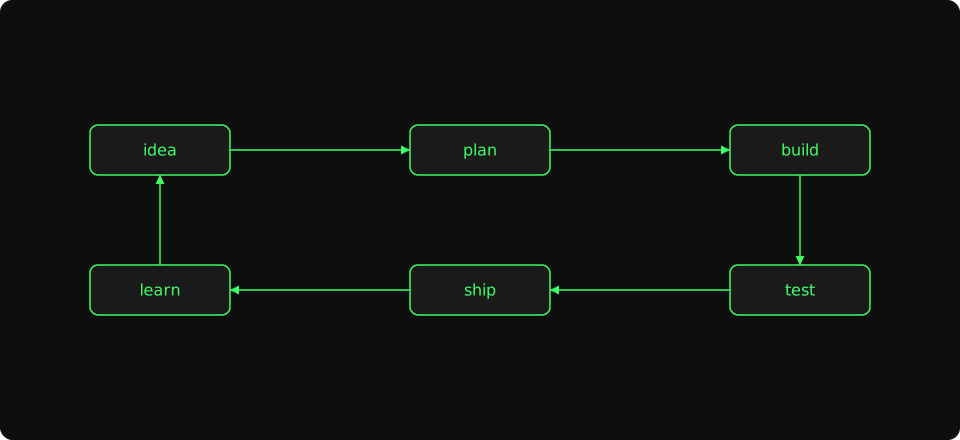
- idea
- Where every PRD starts. A line in
vision.md, a row in the backlog, or something the build log surfaced last week. - plan
- I write a small disposable PRD — short enough to read in one sitting, small enough to discard if it isn't good enough. Reviewer agents run in parallel and the PRD ships when their feedback is addressed.
- build
- Agents implement the PRD against the E2E tests qa wrote first. I review the diff and merge when the build is green and the rounds have closed.
- test
- Playwright runs the E2E suite on every push. Security audits the diff. Brand and accessibility get a final pass before the round closes.
- ship
- The PRD goes live. The build log gets a dated entry, the dashboard marks the row Done, and project-state.md captures any decisions worth keeping.
- learn
- Lessons from the round feed back into vision and the backlog. The next idea inherits what this one taught — that's why it's a loop, not a checklist.
The PRD lifecycle
Vision and roadmap
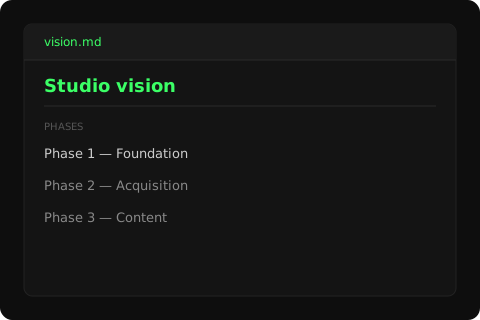
I write a single vision document with a high-level roadmap divided into phases. The vision is the long-running source of truth — it changes when the studio learns something that should change it, and the roadmap re-orders behind it. Everything else on the workflow side ladders to whatever the current phase is.
The visual below is a sanitized excerpt of the actual vision.md — same shape, demo text. The dashboard tour below shows what the live document looks like inside the project view's overview tab.
PRDs as the unit of work
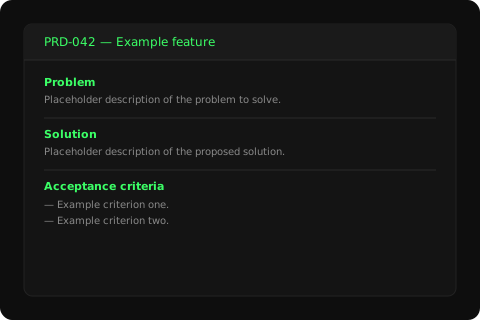
Every backlog item gets a small disposable PRD. The size rule is plain: small enough to evaluate and discard if it isn't good enough. A PRD that survives review becomes the unit of work the agents execute against; a PRD that doesn't gets thrown out and the idea goes back to the backlog.
The visual below is a thumbnail of a PRD file — sanitized header, demo body text. Real PRDs live in docs/prds/ and are linked from the project's status surface; the dashboard tour shows where they appear in the project view.
Review and execution rounds
Each PRD goes through three phases. Preparation runs reviewer agents in parallel — brand, architect, security, qa, marketing, ux, pm — and produces companion specs (copy, ux, adr) when the PRD's table flags one as Required. Design kicks in when ux flags the PRD as needing visual design before code; otherwise it's skipped. Execution is the build phase: qa writes the E2E tests first, the agent team implements against them, security audits the diff, and the dashboard marks the row Done when the round closes.
The strip below reads left-to-right: each label is a role taking a pass at this phase of the workflow. The labels aren't status pills — LIVE/BETA/IN PROGRESS are reserved for the product cards on the homepage and the project sub-pages. Here the labels just mark who runs at which moment.
The dashboard
Build Studio is the studio's operating system and is now available as open source. The screenshots below walk through it by function: how a project is structured, where development happens, and where operations, marketing, and support live. They were captured before the rename, so the interface and captions inside the images still say Agent Dashboard.
Project
Project is the top-level container. Each project has a vision, a roadmap, a backlog, and a folder of PRDs — the dashboard reads those files directly so the workflow tracks the source of truth, not a copy of it.
Development
Development is where review and execution rounds happen. Every PRD passes through here — reviewers run in parallel, execution runs sequentially, and the dashboard records every round so a stalled PRD is visible the moment it stalls. Each agent runs against your choice of Claude Code or Codex; you pick the model per agent and the dashboard wires up the rest.
Operations
Operations is the workflow's other half: services, CI/CD, and runbooks for everything the studio runs in production. Most PRDs touch one tab here at the end of execution.
Marketing
Marketing is where the running services get their go-to-market work done — blog posts, social copy for Facebook and elsewhere, lifecycle messaging, and follow-ups on funnel events. PRD-level marketing review happens earlier in the development loop; this surface is for the ongoing marketing tasks each live product needs.
Support
Support is where incidents, customer reports, and documentation gaps from live products are triaged. The support agent reads a report, proposes a backlog item without changing product code, and can file the approved item into the project repository with a scoped commit.
Support
Propose-only triage, report tracking, and approved backlog filing.
Inside Build Studio
The tour above shows what Build Studio looks like. This section is for the wiring underneath — the parts that earn their keep but don't show up in screenshots. Six pieces hold the loop together.
tmux sessions and git worktrees
Every workflow run gets a fresh git worktree under tmp/.worktrees/ and a dedicated tmux session named for the workflow ID. Each agent runs in its own tmux window with the worktree as its working directory, so two agents can never trip over each other's file edits. On cleanup Build Studio kills any process holding a dev-server port — no zombie ports between rounds — and removes the worktree branch only after the merge lands.
Memory between agents
Agents accumulate structured feedback in a single workflow-state.json keyed by round, step, and role. When a later agent starts, the dashboard injects the last three rounds of feedback into its prompt — truncated to 500 characters per entry — so the architect's notes from round one shape the qa pass in round three. Workflow boundaries are hard: nothing carries between separate workflow runs.
Context budget per agent
Each agent gets roughly a 200K-token budget and a short instruction up front: do the primary task first, report fast, stop if stuck. Learnings are filtered before injection — at most six high-relevance items per domain, each capped at 250 characters. The budget is advisory rather than API-enforced; the discipline lives in what the dashboard chooses to include, not in what the model would otherwise consume.
Agent definitions and per-project overrides
Built-in presets — web-app, api-only, mobile-app, lean — define the default roster and the workflow steps each project starts from. A project's config.yaml can override any of it: pick a preset, add or remove roles, alter step sequences, or map specific steps to different models. Resolution order is project config beats preset beats built-in defaults. Custom presets live in ~/.build-studio/presets/ for cross-project reuse.
Learnings across rounds
Each execution round can write Markdown learnings into docs/learnings/<domain>/, where domain is one of seven categories (architecture, backend, frontend, devops, qa, security, workflow). Subsequent agents read from three tiers — project-local, cross-project at ~/.build-studio/learnings/, and built-in — scored by relevance to the current task. The system is how mistakes from PRD-007 stop showing up in PRD-014 without me having to remember to mention them.
Models per step
Step-to-model mapping resolves at runtime in three tiers: workflow-level overrides set at kickoff, the preset's step_models map, and a global default. Planning-heavy steps default to Opus 4.7; mechanical execution steps default to Sonnet 4.6. The Claude/Codex choice from kickoff applies to developer roles (frontend, backend, ios, android) and reviewer roles (code-reviewer, security); other steps stay on Claude. The same lever supports adding local models later as a third lane.
Open source
Build Studio is available now under the Apache 2.0 license. The repository includes the multi-project hub, project onboarding and scaffolding, review and execution workflows, bundled agent roles, CLI, and the macOS Electron app. I use this same code to run the studio; publishing it makes the workflow inspectable and gives other builders somewhere concrete to report issues, suggest improvements, or adapt it for their own projects.